
Welcome to the CW Platform.

Sign in to your account
Enter you user name and password to access the platform. You will be presented with your Dashboard. What you see here, and what navigation items are available in the top menu bar, will depend on how you are working with us, and the level of access that has been assigned.
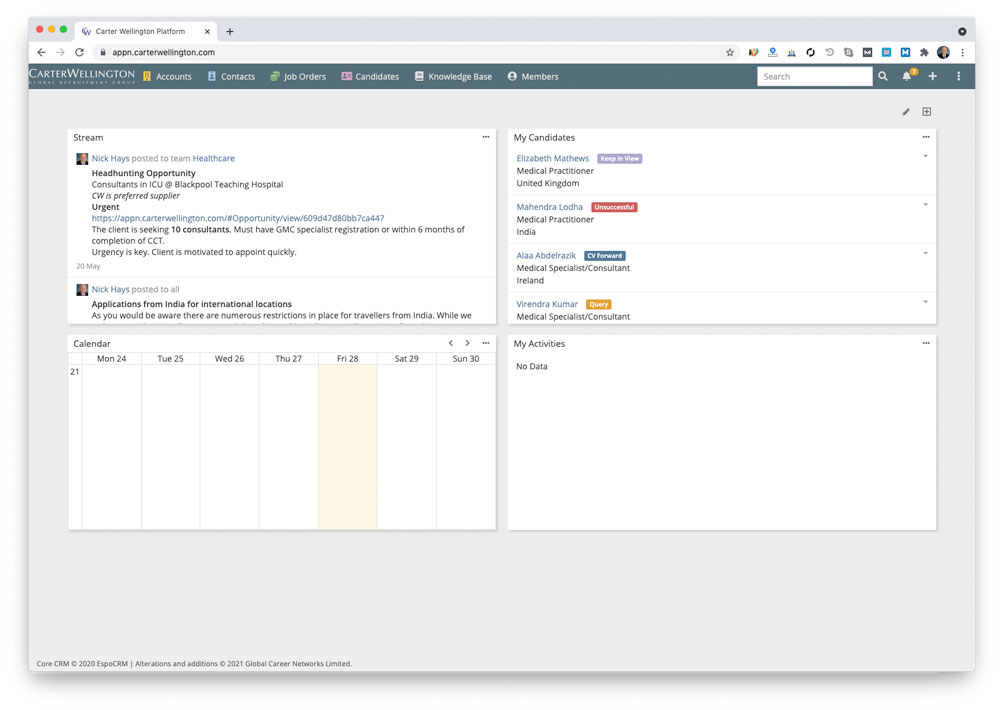
The modules
The Carter Wellington Platform is fully integrated into our website and social media footprint. It is made up of the following modules:
Dashboard: When you log into the platform, you will see the Dashboard module. This screen provides a snapshot of your activities and can include details of your candidates, and if you have a business development or account management role with us, tasks, reminders, and upcoming calendar events to ensure you stay on top of everything.
Activities: All of your daily activities and interactions with candidates, companies and contacts are populated in this module.
Accounts: All of the available Accounts are displayed in this module. Search existing and create new Companies. By default the system will only display records owned or relevant to the logged-in user (you) which is determined by .
Contacts: All of the available Contacts are displayed in this module. Contacts work at the Accounts that are your clients. Search existing and create new Contacts. By default the system will only display records owned or relevant to the logged-in user (you). If you do not have account ownership, then contact records relevant to the account are not available.
Job Orders: All of the available Job Orders are displayed in this module. Search existing and create new Job Orders. By default the system will only display records owned or relevant to the logged-in user (you).
Candidates: All of the available Candidates are displayed in this module. Search existing and create new Candidates. Access your Saved Lists. By default the system will only display records owned or relevant to the logged-in user (you).
Emails: If you have a Carter Wellington email address, then you emails will be available. You can also set up another email client on your desktop or mobile phone if required. Instructions on how to do this would have been emailed to you when your email account was established. If you no longer have this information, you can view it here.
Lists: Create a custom list of Companies, Contacts or Candidates and add relevant records. Examples would be a weekly call list of your clients, or groups of candidates with similar skills or experience that you could contact for a relevant job. By default the system will only display lists owned or relevant to the logged-in user (you).
Calendar: All scheduled events are populated in this module. By default, the Calendar shows the week view of the current week. Add new Events and access your Upcoming Events. By default the system will only display records owned or relevant to the logged-in user (you).
Members: This allows you to view other members in your sector team (Healthcare, I.T., Energy etc.)
Settings: Options to customize your account and CWATS features are available in this module. Users change your Profile, Password. Administrators access your account, change your Career Portal and E- mail configurations, and customize your dashboard, import and backup data.
Help: This takes you to the Help Files (Hint – you are here already!)
The CWATS platform is developed in-house by the Carter Wellington team and new features and enhancements are always being developed and implemented as they become available. As such, you may find some variations between the screen shots and the actual live system.